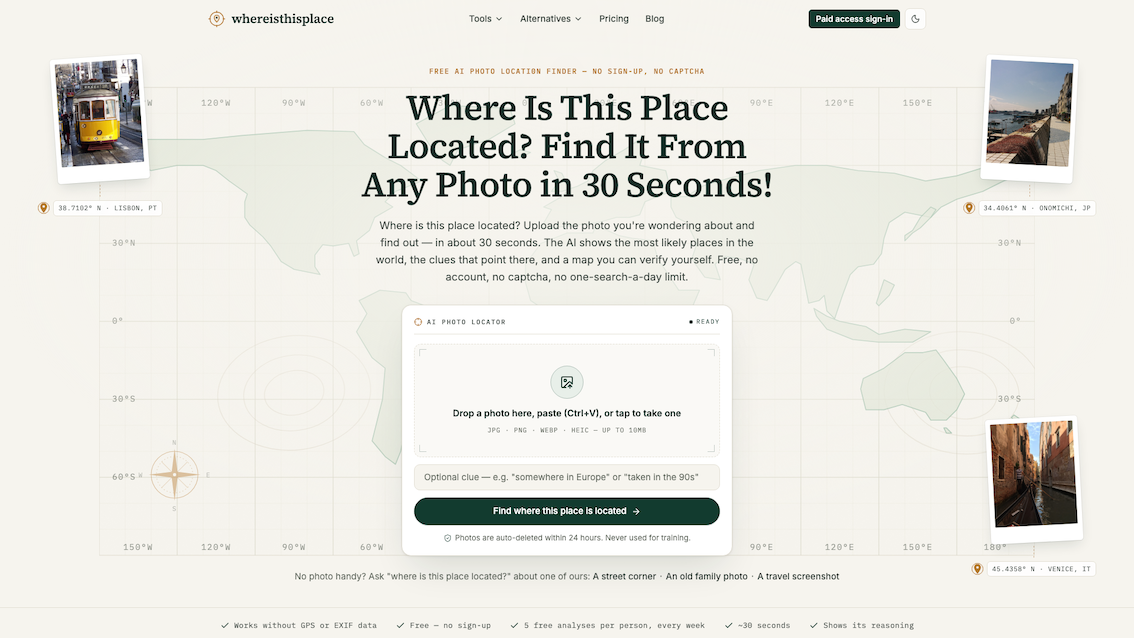
whereisthisplace.online helps people answer a deceptively simple question: where was this photo taken? Upload an ordinary photo, social-media screenshot or Street View frame and the web app checks available metadata, reads visible geographic clues, ranks likely places and explains the evidence behind each result. Instead of returning a black-box pin, it shows candidate locations, confidence, clue-based reasoning and a map so users can verify the answer themselves.
The free tier needs no account and includes up to two analyses per day and five per week. It is designed for images without GPS data, unfamiliar travel photos, old family pictures, listing verification and screenshots from Instagram or TikTok. Browser-only tools also let users inspect or remove EXIF metadata without uploading the file. Photos used for AI location analysis auto-delete within 24 hours by default and are not used for model training. Paid proof is optional and adds an exact pin and Street View comparison when the evidence supports that level of precision.
Core features
- AI scene geolocation from photos and screenshots.
- Metadata-first workflow that checks GPS/EXIF before visual analysis.
- Ranked candidate places with understandable confidence labels.
- Visible clue reasoning based on signs, roads, architecture, terrain and more.
- Map leads and Google Maps links for independent verification.
- Optional exact pin and Street View comparison when evidence supports it.
- Dedicated Instagram, TikTok, reverse image and reverse Street View workflows.
- Location finding when GPS and EXIF have been removed.
- Browser-only EXIF viewer and lossless metadata-removal utility.
- Honest low-evidence outcomes for ambiguous images.
- No account for free analysis.
- 24-hour default deletion and no training on user uploads.
Benefits
- Move from “this looks familiar” to a short, ranked list of plausible places.
- Understand why a place was suggested before trusting or sharing it.
- Keep working after Google Lens or TinEye returns lookalikes or no matches.
- Investigate screenshots and re-saved images that no longer contain GPS data.
- Verify travel inspiration, listings, old photos or visual claims with map evidence.
- Inspect and clean photo metadata without sending the file to a server.
- Test the tool before creating an account or paying for deeper proof.
Use cases
- Identify an untagged travel spot from an Instagram or TikTok screenshot.
- Find where an old family or archive photo may have been taken.
- Check the likely location of a rental, marketplace or property image.
- Recover a lost Street View location from a screenshot.
- Add location leads to desk research, journalism or OSINT verification.
- Investigate an ordinary street photo that has no famous landmark.
- Check whether an image still contains GPS, date or device metadata.
- Remove EXIF data before publishing, emailing or listing a photo.
- Compare public alternatives to Google Lens, GeoSpy, GeoSeer or Picarta.
Problems solved
- Classic reverse-image search finds copies but often does not answer where the scene is.
- Social platforms, screenshots and re-saving commonly remove EXIF and GPS data.
- A single unexplained pin is difficult to trust or verify.
- General chatbots can invent clues or hide uncertainty.
- People may unknowingly share precise GPS and device metadata in photo files.
- Specialist geolocation tools can require accounts, subscriptions or strict daily limits before showing useful reasoning.
Differentiated advantages
- Evidence before confidence: the reasoning and candidates are visible in the free result.
- Location, not lookalikes: visual scene clues work even when the exact photo is not indexed online.
- Honest uncertainty: broad or low-evidence results are preferred over false precision.
- Designed for verification: map and Street View workflows help users try to disprove the suggestion.
- Scenario-specific tools: social screenshots, missing EXIF and Street View frames each have focused workflows.
- Privacy utilities included: users can inspect and remove metadata locally in the browser.
- Try first: free analysis requires no account; paid proof is optional.